

How To Reset Laptop Bios Password?
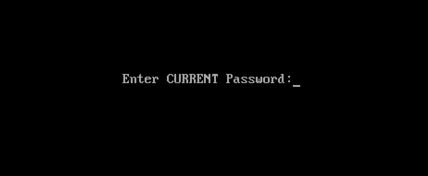
Remove Laptop BIOS Or CMOS Password By Reset
We only use bios password to add up some extra security in our desktop or laptop computers it can also prevent other users to change the bios setting or system booting without any permission.
Just like all our passwords we do forgot one of them and sometimes the forgotten one is be like bios password. In this case most people sending their computer to the IT department or sent back to the manufacture’s service center to break or reset that password and I know it can be expensive because it’s also not covered in the laptop’s warranty. So, doesn’t worry about it ‘cos in this tutorial I’m gonna show you how you can easily remove or break your laptop’s BIOS or CMOS password by just using some backdoor password or removal tricks
This tutorial is intended for experience computer hardware engineer and if you are not one of them or may be a home user then you should have to try it alone, get some assistance from an experience holder person. Otherwise you’ll do it by yourself ’cos I also demonstrate it very well and it’s also not that hard what people are think about it.
Note: Deskdecode is not responsible for the any kind of use or misuse of this material, including loss of data, damage to hardware, or personal injury. Before attempting this tutorial, please take some time and call your laptop customer care support and ask the recommended methods of resetting the bios password, if they won’t help’s you then read this tutorial carefully and try to do it by your own until you’ve fix it.
Just like all our passwords we do forgot one of them and sometimes the forgotten one is be like bios password. In this case most people sending their computer to the IT department or sent back to the manufacture’s service center to break or reset that password and I know it can be expensive because it’s also not covered in the laptop’s warranty. So, doesn’t worry about it ‘cos in this tutorial I’m gonna show you how you can easily remove or break your laptop’s BIOS or CMOS password by just using some backdoor password or removal tricks
This tutorial is intended for experience computer hardware engineer and if you are not one of them or may be a home user then you should have to try it alone, get some assistance from an experience holder person. Otherwise you’ll do it by yourself ’cos I also demonstrate it very well and it’s also not that hard what people are think about it.
Note: Deskdecode is not responsible for the any kind of use or misuse of this material, including loss of data, damage to hardware, or personal injury. Before attempting this tutorial, please take some time and call your laptop customer care support and ask the recommended methods of resetting the bios password, if they won’t help’s you then read this tutorial carefully and try to do it by your own until you’ve fix it.
So Let’s Get Started
There are four different ways what you can use to reset your laptops bios password by taking some different backdoor tricks and here’s the list:
- Reset By Backdoor Passwords
- Reset By Software
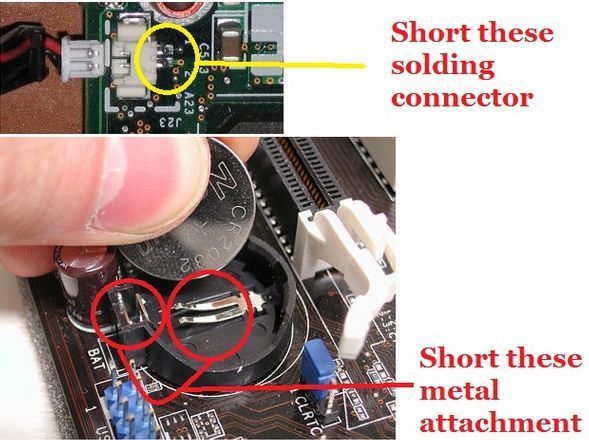
- Reset By Bios Jumper And Solder Bread
- Reset By C-MOS Battery
#1 – Reset By Backdoor Password
There are some of backdoor passwords what your laptop’s bios manufacture company makes to open the bios menu in the case of customer forgets their own created password. Here are some passwords according to the Bios Company.
- Award BIOS backdoor passwords:
| AWARD_SW | KDD | award | j256 |
| Award SW | ZBAAACA | AWARD_SW | J64 |
| HLT | ZAAADA | AWARD?SW | j332 |
| Condo | ZJAAADC | AWARD SW | j322 |
| CONCAT | Djonet | AWKWARD | 01322222 |
| TTPTHA | ALFAROME | Awkward | 589589 |
| aPAf | ALLy | 01322222 | 589721 |
- AMI BIOS backdoor passwords:
| AMI | HEWITT | LKWPETER |
| AAAMMMIII | RAND | A.M.I. |
| BIOS | AMI?SW | CONDO |
| PASSWORD | AMI_SW | AMIBIOS |
- PHOENIX BIOS backdoor passwords:
|

Login Area
User Id
Password

How to see to current password of any windows
Ophcrack is a free Windows password cracker based on Slitaz linux and using ophcrack with modified 'rainbow tables'. It comes with a Graphical User Interface and runs on multiple platforms. Once you have made the bootable USB flash drive, just boot from it and ophcrack will automatically run and display a nice table of all your Windows users and their passwords (if set and if crackable). Slitaz runs entirely in RAM and does not change any files on your target computer (i.e. non-invasive).
Introduction
There are two versions of ISO file for Ophcrack, one for Vista/Win 7 and one for XP - they are essentially the same but contain different rainbow hash tables. This tutorial describes how to prepare a bootable USB drive using the ISO files of these two Ophcrack Live CDs and combine them. When the linux OS boots, it looks for the rainbow tables (table0.bin, etc.) in the \tables folder on all mounted volumes. For this reason the \tables folder from inside each ISO file must be extracted to the USB drive. This means that over 800Mb of files are in the \tables folder and also in the iso files. For this reason, although it is perfectly possible to boot from the ISO files via grub4dos, this tutorial uses the contents of the ISO files to save space on your USB drive as the /tables folder must be in the root of an accessible drive anyway (but see Tutorial 93 for a way to use just the ISO files).
See how easy it is to crack your own PC - maybe you will start using stronger passwords now
Method
The following instructions assumes you know your way around extracting the contents of ISO files, etc. A bootable USB hard disk will load and run ophcrack faster than a slow USB Flash drive...
- For version 3.4.0 download the 46MB without tables liveCD ISO from here and then download the separate free tables for Vista and XP from the Tables tab on the website and unzip them. Make sure you check that the size of the ISO file is correct after downloading and check the MD5 hash is correct (tip: use RMPrepUSB CTRL.C to check the MD5 value).
IMPORTANT: if the folders and files under \tables will appear as all uppercase (e.g. 3.4.0 has \TABLES\XP_FREE_\TABLE0.BIN, etc.) if you use an iso mount utility like imdisk or clonedrive, you must change them all to lowercase filenames (e.g. table0.bin). This must be done for the \tables folder and ALL files under the \tables folder - otherwise Ophcrack will not find the tables! For this reason I suggest you use 7zip to extract files from an iso OR download the ophcrack-notables-livecd-3.4.0.iso and then download the XP and Vista free tables zip files (see Tables tab on website) - the tables in the zip files have all lowercase names but the files in the full LiveCD ISOs are all uppercase if you mount the iso as a volume and so will not work. Always use 7zip or check that you have lower case filenames. - Using WinImage or 7Zip, extract the contents of the ISO. Unzip the free table zip files to folders on your system hard disk as follows:
C:\ophcrack\ophcrack\boot - copy \boot folder from ISO (only the bzimage and rootfs.gz files are needed)
C:\ophcrack\tables\xp_free_small - copy \tables\xp_free_small from XP free tables zip file
C:\ophcrack\tables\vista_free - copy \tables\vista_free from Vista free tables zip file - Create a file in C:\ophcrack called menu.lst using Notepad (press F4 in RMPrepUSB) with the following contents:
title OphCrack Password Cracker LOWRAM (lowram - slower on Vista/Win7 systems)
find --set-root /ophcrack/boot/bzImage
kernel /ophcrack/boot/bzImage rw root=/dev/null vga=normal kmap=uk ophcrack=lowram screen=1024x768x16 autologin
initrd /ophcrack/boot/rootfs.gz
title OphCrack Password Cracker FAST (for more than 512MB RAM systems)
find --set-root /ophcrack/boot/bzImage
kernel /ophcrack/boot/bzImage rw root=/dev/null vga=normal kmap=uk screen=1024x768x16 autologin
initrd /ophcrack/boot/rootfs.gz
kernel /ophcrack/boot/bzImage rw root=/dev/null vga=normal kmap=uk ophcrack=lowram screen=1024x768x16 autologin
initrd /ophcrack/boot/rootfs.gz
title OphCrack Password Cracker FAST (for more than 512MB RAM systems)
find --set-root /ophcrack/boot/bzImage
kernel /ophcrack/boot/bzImage rw root=/dev/null vga=normal kmap=uk screen=1024x768x16 autologin
initrd /ophcrack/boot/rootfs.gz
- you can change kmap=uk to us or de or whatever (though you should not need a keyboard). The login password is 'root' (if required).
- Run RMPrepUSB and use the following settings on a 1GB or larger USB Flash drive or USB HDD:
1. MAX, 2=OphCrack, 3=MSDOS, 4=FAT32+HDD, 5=C:\ophcrack + tick Copy Files --> then click 6 Prepare Drive
- Click on Install grub4dos and if prompted use No=PBR. Then hit[ Enter] to copy grldr when prompted (note: do NOT click on the Windows shell close icon, you must press Enter or the grldr file will not be copied).
Check you now have a USB drive with this contents:
\ophcrack folder
\tables folder NOTE: This should contain a folder which contains the tables - e.g. \tables\xp_free_small\table0.bin, \tables\vista_free_\table0.bin
\grldr file
\menu.lst file - Click on Eject Drive in RMPrepUSB (or use the SystemTray icon).
Now go try it! If you are cracking an XP system, the Vista free tables are not needed - you can move them to another folder temporarily or stop Ophcrack once it starts and deselect the vista table
Subscribe to:
Comments (Atom)